To ensure Magento 2 management efficiency, Store Manager provides multiple tools for quick and accurate Magento 2 massive product changes . The application comprises four Multi Editors aimed to massively update specific product data. In addition, there is the possibility to assign or unassign multiple products to multiple categories.
All together, these tools can help you update enormous amounts of product information with no special skills required. Watch the video below and check how Multi Editors can be applied.
VIDEO
So, let's have a quick glimpse at functional capabilities of each multi editor and consider how they contribute to optimizing catalog updates accomplishment.
With this tool you can update a variety of product details. We listed the most important ones below:
Product availability - enalbe or disable productsProduct name & product description - add the same name and description to multiple productsPrice & Special price - modify price and special price detailsTax class - assign the same tax class for bulk of products at onceQuantity - set the same product quantity to a bulk of productsVisibility - make products visible or invisible in the catalogImages - add images to multiple items at onceMetadata - massively add meta title and meta description
All you have to do is to select necessary value from dropdowns and check the box beside in the same field.
Magento 2 Massive Product Changes In addition, each product detail can be modified with the help of expression editor right away.
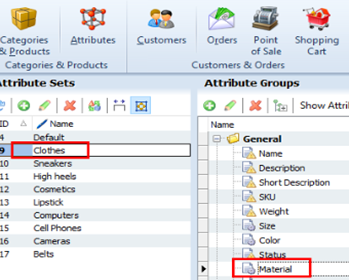
When you process products with Product Multi Editor, make sure they belong to the same attribute set. Contrariwise, you won't succeed with updates, in other words main product (the one you right-click on) will be renewed only.
Magento 2 update inventory is what helps you avoid product shortages, stockouts and unsatisfied customers respectively. Inventory Multi Editor works similarly to product data Multi Editor. Numerous selected products will acquire values you provide in corresponding fields of Multi Editor. The following inventory data can be set massively:
Stock availability
Minimum or maximum quantity allowed in shopping cart
Backorders details
Allow/ disallow quantity increments
Magento 2 MSI feature is usually used by large stores requiring regular source data updates. To eliminate cumbersome work, Store Manager enables bulk assignment and update of the following source detailes:
Source code
Source status
Notify Quantity value
Source quantity
Source update via Store Manager can be accomplished only after Magento 2 sources and stocks were added on the backend side.
Apply tier prices to multiple products by checking a couple of boxes within one window. What tier price conditions can be configured?
Set relations between product quantity and price using special calculators
Activate tier prices for specific customer groups
Make tier price disount fixed or set a percentage value
Magento 2 Massive Product Changes The possibility to customize tier price configuration for each of selected products separately makes Tier Price Multi Editor especially handy. If some of selected products do not need to be updated, you can simply remove them from the editor by applying the Delete action.
One more point to consider is category association. Oftentimes there comes the necessity to rearrange category associations, place one and the same product to more than one category or displace necessary merchandise from one category to another. Whatever manipulation is required, Store Manager can accomplish it. Special functionality caters for quick updating of category associations and, as a result, definite products will get to desired categories.
Magento 2 Massive Product Changes Data appending from the file or import is considered to be the fastest method of Magento product update accomplishment. Having necessary products and related details in the file you, you can upload it via corresponding import wizard and instantaneously renew specified products. How to import products is covered in the article mag-manager.com/product-information/magento-product-management/how-to-import-products-in-magento-2/
If you need to run independent data uploads and get your products renewed at predefined time, learn how to make data import automated
- www.mag-manager.com/product-information/magento-product-management/how-to-import-products-in-magento-2/
Maintain accurate content and maximize product management productivity with Store Manager for Magento.